May 16, 2026: Microsoft is preparing a major update for Windows 11 that gives users more control over the Start menu and taskbar. The company says the goal is to improve performance, reliability, and personalization while also listening closely to user feedback.
One of the biggest upcoming changes is the return of movable taskbars. Windows Insiders in the Experimental channel can now place the taskbar on any side of the screen , top, bottom, left, or right. This has been one of the most requested features since the launch of Windows 11.
Users will also be able to customize icon alignment depending on where the taskbar is placed. For example, if the taskbar is moved to the side, icons can appear centered or aligned to the top. The Start menu and Search panel will automatically adjust based on the taskbar’s position.
Windows 11 Users to Get More Control Over Start and Taskbar
Microsoft says this feature will especially help developers, multitaskers, and users who want more screen space. Vertical taskbars can also make it easier to manage multiple open apps with labeled windows.
Another important addition is a smaller taskbar option. Windows 11 originally introduced a larger taskbar design to improve touch support, but many users felt it reduced usable screen space. The new compact mode shrinks taskbar icons and height, giving users more room for apps and content.
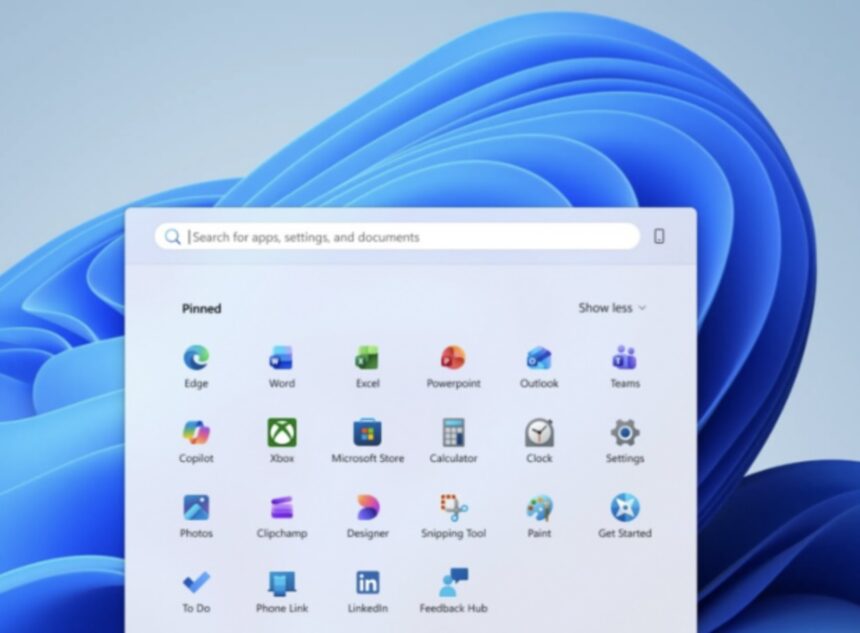
The Start menu is also getting a major refresh focused on simplicity and user control. Microsoft is introducing easier settings that allow people to independently show or hide sections like Pinned apps, Recommended items, and the All Apps list.
The company is also separating file recommendations from other recent activity settings. This means users can turn off recommended files in Start without affecting File Explorer suggestions.
Users will additionally get options to choose Start menu sizes, including Small and Large layouts, and can even hide their profile picture and name for extra privacy during presentations or screen sharing.
Microsoft is also improving the quality of recommendations shown inside Start. The “Recommended” section will soon be renamed “Recent” to better reflect the type of content displayed there, including recently opened files and newly installed apps.
According to Microsoft, these updates are part of a larger effort to make Windows feel more personal and easier to use. The company says it is still working on additional improvements, including better touch support, drag-and-drop functionality, and support for different taskbar positions across multiple monitors.
The features will roll out gradually to Windows Insiders over the coming weeks before a wider release.