thenewsfacts.com
  • Home
  • Latest News
  • Trending News
  • Technology
  • entertainment
  • Sports
  • Business
thenewsfacts.comthenewsfacts.com
Font ResizerAa
Search
  • Home
  • Latest News
  • Trending News
  • Technology
  • entertainment
  • Sports
  • Business
Follow US
© thenewsfacts : All Rights Reserved.

Home » Windows 11 Finally Brings Back Movable Taskbar

Technology

Windows 11 Finally Brings Back Movable Taskbar

TheNewsFacts
Last updated: May 16, 2026 6:51 pm
TheNewsFacts
Share
Windows 11
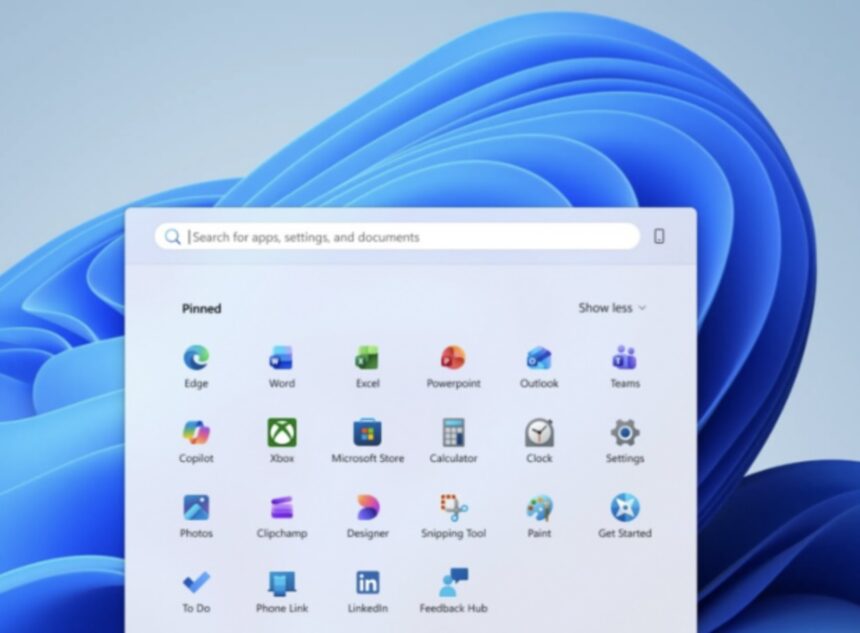
Windows 11 Finally Brings Back Movable Taskbar : Image @WindowsBlog
SHARE

May 16, 2026: Microsoft is preparing a major update for Windows 11 that gives users more control over the Start menu and taskbar. The company says the goal is to improve performance, reliability, and personalization while also listening closely to user feedback.

One of the biggest upcoming changes is the return of movable taskbars. Windows Insiders in the Experimental channel can now place the taskbar on any side of the screen , top, bottom, left, or right. This has been one of the most requested features since the launch of Windows 11.

Users will also be able to customize icon alignment depending on where the taskbar is placed. For example, if the taskbar is moved to the side, icons can appear centered or aligned to the top. The Start menu and Search panel will automatically adjust based on the taskbar’s position.

Windows 11 Users to Get More Control Over Start and Taskbar

Microsoft says this feature will especially help developers, multitaskers, and users who want more screen space. Vertical taskbars can also make it easier to manage multiple open apps with labeled windows.

Another important addition is a smaller taskbar option. Windows 11 originally introduced a larger taskbar design to improve touch support, but many users felt it reduced usable screen space. The new compact mode shrinks taskbar icons and height, giving users more room for apps and content.

The Start menu is also getting a major refresh focused on simplicity and user control. Microsoft is introducing easier settings that allow people to independently show or hide sections like Pinned apps, Recommended items, and the All Apps list.

The company is also separating file recommendations from other recent activity settings. This means users can turn off recommended files in Start without affecting File Explorer suggestions.

Users will additionally get options to choose Start menu sizes, including Small and Large layouts, and can even hide their profile picture and name for extra privacy during presentations or screen sharing.

Microsoft is also improving the quality of recommendations shown inside Start. The “Recommended” section will soon be renamed “Recent” to better reflect the type of content displayed there, including recently opened files and newly installed apps.

According to Microsoft, these updates are part of a larger effort to make Windows feel more personal and easier to use. The company says it is still working on additional improvements, including better touch support, drag-and-drop functionality, and support for different taskbar positions across multiple monitors.

The features will roll out gradually to Windows Insiders over the coming weeks before a wider release.


TAGGED:Microsoftmicrosoft windowsPC UpdateSoftware UpdateStart MenuTaskbarTech NewsUser PersonalizationWindows 11Windows FeaturesWindows InsiderWindows Update
Share This Article
Email Copy Link Print
Previous Article Mettle Capital Mettle Capital Signals New Startup Funding Cycle
Next Article Viyona Fintech VIYONA Joins Elite NPCI-Certified Fintechs with Full-Stack UPI Certification

Your Trusted Source for Accurate and Timely Updates!

We're committed to providing accurate and unbiased news as it unfolds, earning the trust of a large audience. Stay informed with our news updates on the latest events and trends, keeping you ahead of the curve.
FacebookLike
XFollow
InstagramFollow

Popular Posts

Mithali Raj Wins Heart, Team India Goes Down to New Zealand in 2nd ODI

Skipper Mithali Raj’s 61st ODI fifty wasn't good enough to help her team win over…

By
TheNewsFacts

MS Dhoni Gifted Match Ball Act Garners Widespread Appreciation

April 20, 2024 — MS Dhoni displayed his trademark humility during the Chennai Super Kings…

By
NewsFacts Bureau

December 1, Now Start Playing Amazon Quiz, Win Rs. 5000

Today, is December 1, and you can begin by playing Amazon Quiz, to win Rs…

By
TheNewsFacts

You Might Also Like

AI Expert Slams Call for 6-Month Moratorium on Progress Beyond GPT-4
Technology

AI Expert Slams Call for 6-Month Moratorium on Progress Beyond GPT-4

By
TheNewsFacts
Google Pixel 10
Technology

Google Pixel 10 Debuts Triple Camera, Bigger AI Push at ₹74,999

By
NewsFacts Bureau
Xiaomi 14 Review
Technology

Xiaomi 14: The Compact Flagship That Packs a Punch

By
TheNewsFacts
Tata Super App 'TataNeu' Arrives in App Stores on April 7
Technology

Tata Super App ‘TataNeu’ Arrives in App Stores on April 7

By
TheNewsFacts
thenewsfacts thenewsfacts

About US


TheNewsFacts: Brings you the interesting facts, news facts and updates from India an the world across politics, tech, entertainment, business, tending, and more. We deliver what you love to read.
Top Categories
  • Latest News
  • Trending News
  • Paris Olympics 2024
  • Sports
  • Entertainment
  • Business
  • Technology
Usefull Links
  • About The News Facts
  • Latest News
  • Privacy Policy
  • Editorial Policy
  • Disclaimer
  • Contact Us
Follow us
Facebook Twitter Instagram

© thenewsfacts. All Rights Reserved.

Welcome Back!

Sign in to your account

Username or Email Address
Password

Lost your password?